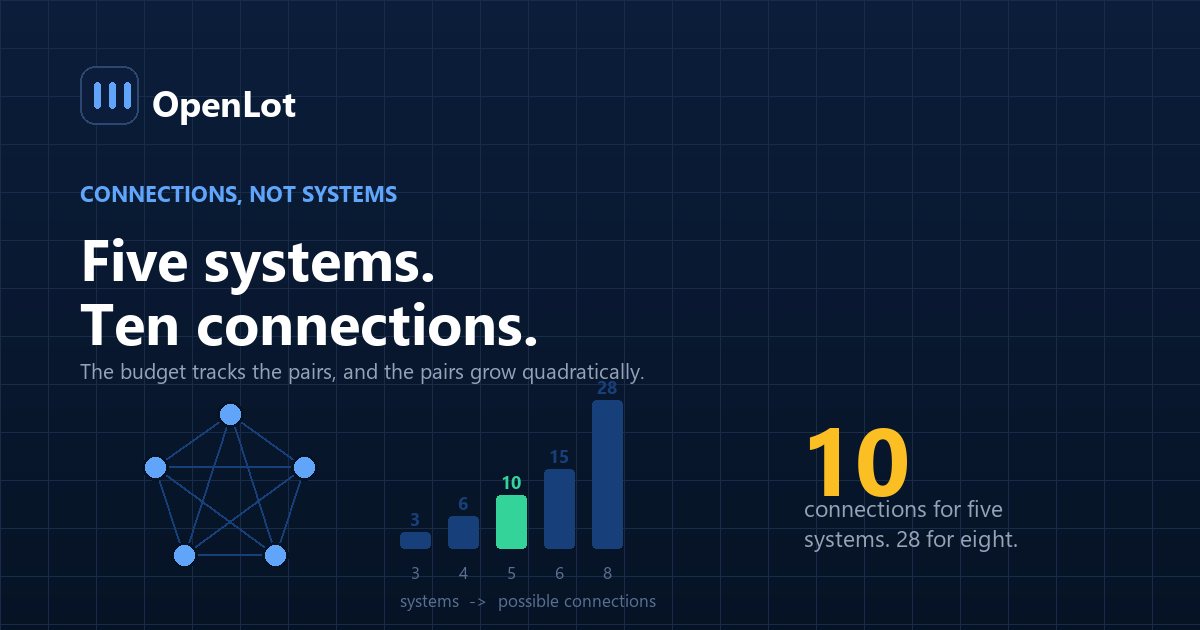
AI integration services are the work of making a new system exchange data correctly with the systems a dealership already runs. It is the largest line item nobody plans for, because the number of connections grows faster than the number of systems — five systems imply up to ten connections, not five.
This guide covers why integration cost grows faster than system count, what the work actually contains, how it is priced, where integrations break, and what to demand before signing.
Why does integration cost more than people plan for?
Because people count systems, and the cost tracks connections.
Add a sixth system to five and you did not add one integration. You added up to five new pairs that might need to exchange data. The ceiling on connections between n systems is n(n−1)/2, and while no dealership needs every pair, the growth is quadratic rather than linear — which is why the integration budget always surprises on the second project rather than the first.
The connection arithmetic
Illustrative ceiling. Your real number is lower, and the point is the shape.
Systems Possible connections What that looks like 3 3 DMS, CRM, website 4 6 plus an inventory tool 5 10 plus a messaging platform 6 15 plus an AI layer over all of it 8 28 a group with service and F&I tooling You will not build all of them. But every one you do build is a separate agreement, a separate set of credentials, a separate failure mode and, frequently, a separate monthly fee — and it recurs per rooftop.
Count the pairs that genuinely must exchange data before anyone quotes you a platform. That number, not the system count, is the size of the project.
This is also why "it integrates with your CRM" is close to meaningless as a claim. Integrates how — read-only, write-back, real-time, nightly batch? With which object types? That distinction is the whole project.
What does the integration work actually contain?
Five things, roughly in the order they consume time.
1. Access. Getting credentials, API keys and permissions from vendors who have no commercial interest in granting them quickly. This is a negotiation, not a technical task, and on legacy systems it is frequently the longest step.
2. Field mapping. Your CRM calls it lead_source; the new system calls it channel; neither agrees on the values. Mapping is tedious, undramatic, and where most of the correctness lives. Get it wrong and your attribution silently degrades.
3. Deduplication and identity. Deciding what makes two records the same human. Without this, an automated system contacts the same customer three times from three threads — the failure mode that makes existing data decay visible to customers rather than just to reports.
4. Write-back rules. What the new system is allowed to change, and what it must never touch. Read access is easy to grant and low-risk. Write access is where an integration can damage the system of record, and it needs explicit, narrow rules.
5. Monitoring. Knowing when the connection breaks. Integrations fail silently by default — the data simply stops arriving — and the gap is usually discovered by someone noticing that leads went quiet. Monitoring belongs in the hardening week of the implementation plan, not in a later phase.
Read is cheap, write is expensive
The single largest cost driver is whether the integration writes back. A read-only connection that pulls leads and inventory is comparatively simple and comparatively safe. A connection that creates records, updates statuses or logs activity into your DMS touches your system of record, which means it needs permissions, validation, rollback and an audit trail.
Price the two separately. Most vendors quote one number.
How are integration services priced?
| Model | Typical shape | Watch for |
|---|---|---|
| One-time setup fee | Per connection, per rooftop | Whether "per rooftop" was disclosed before or after signature |
| Monthly connector fee | Recurring, per connection | It never stops, and it scales with your growth |
| Bundled into the platform | "Included" | Usually means read-only, or a limited field set |
| Project-based build | Fixed price against a spec | Only meaningful if the spec names systems and versions |
The combination that causes trouble is a bundled claim that turns out to mean read-only, discovered after go-live, requiring a project-based build that was never budgeted. Ask which fields are included and whether write-back is in scope, in writing, before signing.
The broader cost pattern — and the reason integration is frequently the deciding factor between building and buying — is that licensed integrations recur and are re-done on every vendor change, while an integration you own is paid for once.
Where do dealership integrations break?
1. A vendor changes an API without telling you. Fields get renamed, endpoints deprecate, rate limits tighten. The connection stops. If nobody is monitoring, you find out from a gap in your lead flow.
2. Nightly batch is treated as real-time. A system that syncs overnight cannot support a sixty-second response commitment. Plenty of integrations are sold without that distinction ever being stated, and the operational promise built on top of them quietly cannot be kept.
3. Permissions drift. The credential belonged to an employee who left, or a vendor rotated keys, or someone tightened a role. The integration was working and now returns empty.
4. Write-back creates records nobody expected. An automated system logging every touch into the CRM can double activity counts, break manager reporting, and make the data worse than before it was connected.
5. It becomes a single point of failure. When a connection becomes load-bearing, its outage is your outage — the same exposure covered in the DMS continuity plan, with one more link in the chain.
What should you demand before signing?
| Item | Why it matters |
|---|---|
| Named systems and versions | "Your CRM" is not a specification; VinSolutions, current tenant is |
| Field-level scope | Which fields are read, which are written, which are ignored |
| Sync mode and latency | Real-time, near-real-time or batch, stated as a number |
| Per-rooftop pricing, in writing | The most common surprise in group deployments |
| Failure behaviour and alerting | Who is told, how fast, when the connection drops |
| Credential ownership | Keys in your accounts, not in an employee's or a vendor's |
If a proposal cannot answer sync latency with a number, the operational commitments built on top of it are unsupported.
Frequently asked questions
What are AI integration services for dealers?
They are the work of connecting an AI system to the software a dealership already runs — DMS, CRM, inventory tools, lead sources and messaging platforms — so that data moves correctly between them. The work covers access and credentials, field mapping, deduplication, write-back rules and monitoring, and it is usually the largest unplanned line item in an AI deployment.
Why does integration cost grow faster than the number of systems?
Because cost tracks connections rather than systems, and connections grow quadratically. Three systems imply up to three connections, five imply up to ten, and eight imply up to twenty-eight. No dealership builds every pair, but each one that is built is a separate agreement with its own credentials, fees and failure modes, often charged per rooftop.
What does "integrates with your CRM" actually mean?
Usually less than it sounds. The claim says nothing about whether the connection is read-only or writes back, which fields are covered, or whether data moves in real time or in a nightly batch. Those three distinctions determine most of the cost and nearly all of the operational value, so they belong in writing before signature.
How much do dealership integrations cost?
Pricing appears as one-time setup fees per connection, recurring monthly connector fees, bundles that are "included" in a platform, or project-based builds. Setup fees and connector fees are commonly charged per rooftop, which is the single most frequent budget surprise in group deployments and should be confirmed in writing beforehand.
Is write-back access worth the extra cost and risk?
It depends on whether the system needs to be the record of what happened. Read-only connections are cheaper and safer, but a system that cannot log its own activity leaves your CRM incomplete. If you grant write access, the rules need to be narrow and explicit, with validation and an audit trail, because the integration is now touching your system of record.
How do I know when an integration has broken?
Only if someone built monitoring, because integrations fail silently by default — the data simply stops arriving. Alerting on connection failure, with a named recipient and a response expectation, has to be specified as part of the work. Without it, the usual discovery method is noticing that lead flow went quiet.
Can a nightly batch sync support fast lead response?
No. A system that receives leads overnight cannot support a response commitment measured in minutes, and no amount of speed on the AI side compensates. If the operational promise is fast first touch, the integration has to be real-time or near-real-time, and that requirement should be stated as a latency number in the scope.
Who should own the integration credentials?
The dealership, in accounts the dealership controls. Credentials held in an employee's personal account break when that person leaves, and credentials held only by a vendor become a switching cost. Credential ownership belongs in the handover clause alongside source code and runbooks.
Conclusion
- Count connections, not systems. The ceiling is n(n−1)/2, and the budget tracks that curve rather than the system count.
- Read is cheap, write is expensive. Price them separately, and make write-back rules narrow and explicit.
- "Integrates with your CRM" is not a specification. Fields, direction and latency are the specification.
- Per-rooftop pricing is the usual surprise. Get it in writing before signature, not after the second store.
- Integrations fail silently. If nobody built the alerting, your discovery method is a gap in lead flow.
Last updated: